


Ramp
4.7528.00 Reviews
App Specs
- Version
- 0.160.2
- Updated On
- License
- Free
- Downloads
- 100,000+
- Developer
- Ramp Business Corporation
- Categories
- Finance
- Platform
- Android
Screenshots
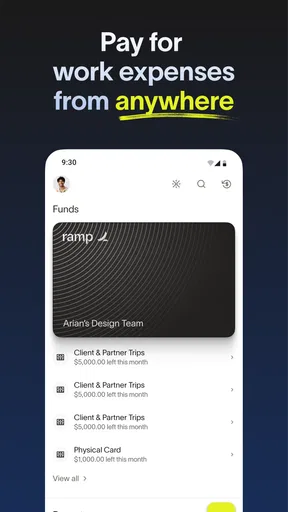
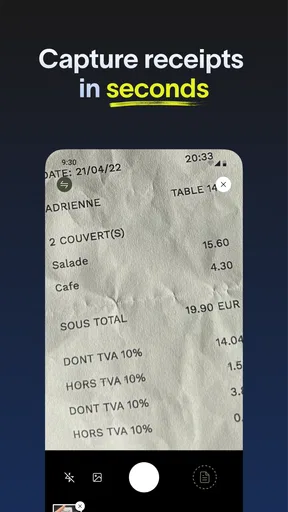
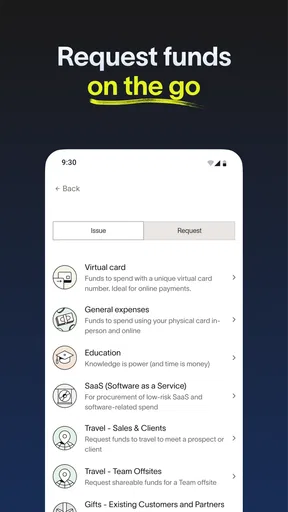
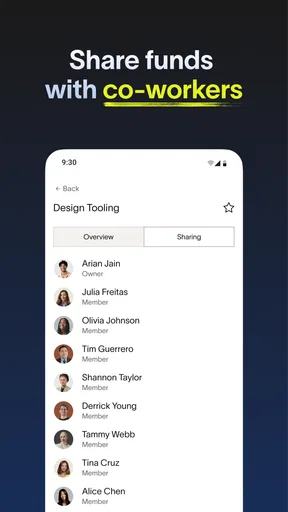

 Analysis by AppCompare
Choosing a finance app is less about finding the one with the longest feature list and more about matching the tool to the way you already handle money. I found Ramp most interesting as a business-focused finance app rather than a general personal budgeting tool. It is developed by Ramp Business Corporation, is free to install, and is aimed at people who want a clearer way to manage company spending from a mobile device.
My first impression was that the app makes the most sense when several people are involved in purchasing decisions. A solo user looking only for a personal expense tracker may find the business orientation unnecessary, while a small team can benefit from having spending activity organized in one place. That distinction matters more than the app’s short store summary, “Ramp,” suggests.
The app has built a strong public reception, with a 4.7 average from around 2.3 thousand ratings and more than 100 thousand installs. Those figures do not replace personal testing, but they do suggest that Ramp is reaching a real audience rather than serving as a rarely used companion app. It is rated for Everyone, which makes the basic app suitable for a broad audience, although the financial decisions made through it still require adult judgment and appropriate business access.
How I would decide whether Ramp fits
I would judge Ramp by whether it solves a recurring business-spending problem, not by how useful it feels during the first few days. In this section, I focus on the people, routines, and records that determine whether the app fits a real team. The next part looks at the situations where that fit becomes especially persuasive.
Start with the spending problem, not the app category
Before choosing Ramp, I would ask what is currently going wrong. Are employees buying items without a clear approval path? Are receipts scattered between email, paper folders, and chat messages? Does the person responsible for finances have to reconstruct spending at the end of the month? If the answer is yes to several of these questions, a business finance app can save more time than a simple personal expense tracker.
In my experience, the strongest reason to consider Ramp is not merely recording transactions. It is the possibility of creating a more disciplined routine around company spending. A useful workflow starts before a purchase: decide who can spend, what the purchase is for, and how the supporting information will be captured. The app becomes more valuable when everyone follows that routine consistently.
I would also consider the size and structure of the team. A small company with a few people sharing purchasing duties may appreciate a centralized view. A freelancer who pays only personal bills probably needs something simpler. A larger organization with complicated accounting requirements should examine how well Ramp fits its existing processes before asking everyone to switch.
Worth Reading Before You Choose

EA SPORTS FC Mobile 26 Is a Bigger Football Game, but It Takes Time

Flipboard Shows What News Apps Must Do Beyond the Feed

Switching to Android Auto Means Rethinking Your Driving Routine

Google Calendar Makes a Crowded Week Easier to Manage

Ludo King Makes the Most of the Minutes Between Plans

Baby Panda World Brings Quick Play to Modern Phones, but Its Game Library Feels Busy
Think about the daily users
The person approving spending, the person making the purchase, and the person reconciling the records may all use the app differently. That makes ease of use important. If employees avoid opening the app because the process feels slow, the finance team will still be chasing receipts and explanations.
I would introduce Ramp with one clear rule: every business purchase should be connected to a recognizable purpose as soon as possible. This is a more useful habit than asking staff to remember everything at the end of the month. It also gives managers a better chance to spot unusual spending while the context is still fresh.
A practical test is to choose a normal workday rather than an ideal demonstration. Imagine a team member buying supplies, paying for a client-related expense, or handling a recurring service. Can that person complete the required steps without asking the finance manager for help? If the answer is no, the problem may be the company’s setup rather than the app itself, but it is still a real adoption cost.
What I would check before moving over
I would not install Ramp and immediately make it the only financial workflow. First, I would map the current process: where spending is authorized, where receipts are stored, who reviews transactions, and how records reach the accounting system. Then I would compare that process with what the team expects to do inside Ramp.
This preparation reveals a less obvious trade-off. A finance app can make information more visible, but visibility is useful only when the business has agreed on categories, responsibilities, and review timing. Without those decisions, the app may simply give the team a new place to store inconsistent information.
I would also check device compatibility before asking a whole team to adopt it. The current version is 0.160.2, and the minimum operating system is iOS or Android 11. That is not an issue for many recent phones, but an older company device can become an unexpected obstacle. Testing the app on the actual phones used by staff is more reliable than assuming every employee has a current device.
Where Ramp is most convincing
Ramp is most convincing when several people need to make purchases while someone else must keep the records clear and reviewable. I’ll look beyond the convenience of having an app and consider the practical value of building a steady routine around purchase context. That leads naturally to the cases where a different kind of finance tool may be the better match.
A better fit for shared business spending
Ramp feels most convincing when spending is shared across a business and accountability matters. Instead of treating every purchase as a private note in someone’s phone, the team can approach expenses as part of a common process. That shift is valuable because finance problems often come from missing context rather than from the transaction itself.
For example, imagine a small design studio preparing for a client presentation. One employee buys materials, another pays for transport, and a manager later needs to understand why both costs were necessary. A personal budgeting app might record the amounts, but it would not naturally solve the team’s need for business context. Ramp is better suited to the question, “What was this purchase for, and how should the company review it?”
That is one of the app’s practical strengths: it encourages a separation between personal money management and company spending. I would not use a personal finance app as a substitute for a business workflow simply because it has attractive charts. The right tool must reflect who is responsible for the money and who needs to see the records.
Useful habits for keeping records clean
One tip I would give a new team is to make receipt capture part of the purchase routine rather than a monthly chore. When someone waits until the end of a reporting period, small details disappear: the reason for the purchase, the project involved, or whether the item was for a customer or internal use. Entering the context promptly makes later review much easier.
A second useful habit is to establish a short internal naming convention for projects or spending purposes. The exact labels will depend on the business, but consistency matters. If one person writes “client work,” another writes “customer project,” and a third writes only a vendor name, the records become harder to scan. Ramp can support a disciplined process, but the team still has to agree on the language.
A third insight is that managers should review unusual transactions during the normal workweek instead of leaving every question for a single end-of-month session. Early review reduces the chance that an employee has forgotten the details. It also makes the app feel like an active control point rather than a passive archive.
Low financial entry cost, but not zero effort
Ramp is free to download, which lowers the barrier to trying it. That is helpful for a small company that wants to evaluate a business finance workflow without first committing to an app purchase. The free price should not be confused with a guarantee that switching will cost nothing in time or administration, however.
The real investment is behavioral. People need to learn when to record information, how to describe purchases, and who is responsible for reviewing them. If the company already has a reliable process, moving to Ramp may create duplicate work during the transition. If the current process is disorganized, the initial setup may feel demanding precisely because it exposes old habits.
I would treat the free installation as an opportunity for a controlled trial, not as a reason to move every transaction immediately. Start with one spending group or one small team, observe where people hesitate, and refine the internal instructions. That approach gives a clearer picture of the app’s value than simply asking everyone to install it and hoping the workflow changes by itself.
Accessible for a broad audience
The Everyone age rating is reassuring from an accessibility standpoint, especially when a company has employees with different levels of technical confidence. Still, an age rating does not explain the complexity of a business approval process. I would keep the company’s instructions simple and show new users the exact moment when they should open Ramp.
That matters because finance tools often fail through uncertainty. An employee may wonder whether a purchase belongs in the app, whether a receipt is required, or whether a manager has already seen it. Clear internal rules make the app easier to use than a long training document full of exceptions.
What the reception tells me, and what it does not
The app’s 4.7 average and roughly 528 written reviews indicate a generally positive experience among people who chose to rate it. I see that as encouraging, particularly for an app that depends on regular business use. At the same time, ratings are not a substitute for checking whether the workflow matches a particular company.
A finance app can be highly rated and still be a poor fit for a business with specialized approval layers, unusual purchasing rules, or a strong dependence on another system. I would use the public response as a reason to investigate Ramp, not as proof that it will solve every finance problem.
Where a different category may fit better
A business spending workflow is not the right answer to every money-management need, and choosing a broader tool than necessary can create extra work. Here I compare the kinds of situations where personal budgeting, formal accounting, or a simpler expense process may serve someone better. Once that distinction is clear, the next question is what a changeover actually asks of a team.
Personal budgeting apps remain better for individual money
If your main goal is tracking household bills, savings, subscriptions, or personal spending, Ramp is probably not my first recommendation. A personal budgeting app is designed around an individual or family view of money. Its language and workflows are usually easier to understand when there is no company approval structure involved.
Using a business-oriented tool for personal finances can add friction without adding useful control. You may spend time thinking about business categories and shared responsibility when all you wanted was a quick view of your monthly household spending. In that situation, a traditional personal finance app is the more sensible alternative.
Accounting software may be stronger for formal bookkeeping
Ramp should also be evaluated differently from full accounting software. Accounting platforms are built around broader bookkeeping responsibilities, reporting, tax preparation, and financial records. If your accountant already relies on a specific system, the most important question is how Ramp would fit beside it, not whether it looks more modern on a phone.
I would choose accounting software first when the central problem is maintaining formal books. I would consider Ramp when the central problem is controlling and organizing business spending before it becomes a bookkeeping problem. Those are related needs, but they are not identical.
Spreadsheets can still win for a very small operation
A spreadsheet remains a reasonable option for a founder with very few transactions and no employees making purchases. It is flexible, familiar, and easy to customize. If the owner already reviews every expense personally, moving to a dedicated app may not save enough time to justify changing habits.
The spreadsheet advantage disappears as soon as several people enter information in different ways. At that point, the business may spend more time correcting categories and requesting missing receipts. Ramp becomes more attractive when consistency and shared visibility matter more than customization.
Expense-only tools may be enough for occasional reimbursement
Some teams only need to collect employee reimbursements. If that is the entire requirement, a narrow expense-reporting tool may be easier to explain and maintain. Ramp makes more sense when the company wants a broader approach to business spending rather than a single channel for submitting claims.
This is an important distinction for a small business owner. More structure is not automatically better. The best choice is the lightest workflow that reliably captures the information the company actually needs.
What switching to Ramp really involves
Switching tools is as much a process decision as an installation decision. I’ll consider how to test Ramp without disrupting established records, how to surface unclear rules early, and why a limited rollout can reveal more than a company-wide launch. Those practical costs help frame the recommendation that follows.
Begin with a limited pilot
I would begin with a small group that represents normal usage: one manager, one frequent purchaser, and one person who reviews financial records. This group can test the full path from purchase to review without putting the entire organization through an unfinished process.
During the pilot, I would record questions rather than solving every issue informally. If several people ask where to add a receipt or how to identify a project, that is a sign the company needs a clearer rule. The goal is not only to test the app; it is to test whether the business can describe its own spending process clearly.
Expect a temporary duplicate process
Switching finance tools usually creates a period when the old and new methods overlap. That can feel inefficient, but it protects the business from losing records while employees learn. I would set a clear end point for the overlap and explain which system is considered authoritative during the transition.
Another practical step is to decide how historical information will be handled. Old records may not need to be moved into a new workflow immediately. In many cases, keeping the previous records where they are and starting Ramp with a clearly defined date is less confusing than trying to rebuild the entire history at once.
Train for decisions, not buttons
Rather than giving employees a tour of every screen, I would teach three decisions: when a transaction belongs in Ramp, what context must accompany it, and what to do when the normal path does not apply. This makes training more useful because people learn the reason behind the workflow.
I would also nominate one internal owner for questions. Without that person, employees may create different interpretations and the company will slowly develop several unofficial versions of the process. The app can centralize spending information, but only a human owner can keep the rules consistent.
Watch for the hidden cost of poor discipline
The biggest switching risk is not installation. It is partial adoption. If half the team records purchases promptly while the rest continues using messages and paper receipts, the finance manager will still have to chase information. In that situation, Ramp may appear ineffective even though the real problem is inconsistent use.
For that reason, I would measure success through everyday outcomes: fewer unanswered transactions, faster receipt collection, and less time spent asking what a purchase was for. I would avoid judging the app only by how polished it feels during the first session.
My recommendation after weighing the trade-offs
My recommendation comes down to whether the team is willing to maintain a shared spending habit after the initial setup. I weigh Ramp’s potential recurring value against the attention required to keep records consistent, so the conclusion is useful both to businesses ready for a change and to those better served by their current approach.
Who I would recommend it to
I would recommend Ramp to a small or growing business that needs a more organized approach to shared spending and wants employees to participate in the process. It is especially worth considering when the current alternative is a mixture of personal cards, chat messages, email attachments, and a spreadsheet that one person must constantly repair.
The app’s free price makes an initial evaluation easier, and its strong average rating suggests that many users find it worthwhile. I also appreciate that the product is clearly positioned around business finance rather than pretending to be a universal money app. That focus makes the decision simpler for the right audience.
Who should skip it
I would skip Ramp if I only needed personal budgeting, basic bill tracking, or a private record of household spending. I would also be cautious if my company already has a mature accounting and expense process that employees follow reliably. Replacing a working system can create more disruption than benefit.
I would be equally cautious for a business with complex financial requirements that have not been mapped out. No app can decide the company’s approval rules, accounting responsibilities, or documentation standards for it. Those decisions should come first.
My practical starting plan
If I were introducing Ramp to a team, I would install it on the devices people actually use, select one contained spending workflow, and write a short rule for what must be recorded. I would then run the process long enough to see ordinary purchases, unusual purchases, and a review cycle. Only after that would I expand it to more employees.
I would keep the old records available, appoint one person to answer questions, and review the pilot for missing context rather than merely counting completed entries. This approach makes the cost of switching visible and prevents a rushed rollout from creating a second layer of administrative work.
Ramp is not a replacement for personal budgeting software, a complete accounting platform, or a simple spreadsheet in every situation. In my view, its value appears when a business needs shared responsibility around spending and wants a mobile-first habit for keeping transactions understandable. For the right team, the real benefit is not just seeing expenses; it is making each purchase easier to explain, review, and manage.
Overall, I would recommend giving Ramp a careful trial to businesses that have outgrown informal expense tracking. I would not recommend adopting it simply because it is free or well rated. Match it to a specific spending problem, prepare the team for the workflow change, and compare the result with the system you already use. That is the fairest way to decide whether Ramp genuinely saves time in your business rather than adding another place to check.
Pros
- Simple interface makes navigation quick for new users.
- Useful tools are available without requiring advanced technical knowledge.
- Responsive performance on most modern Android and iOS devices.
- Regular updates can improve stability and add useful refinements.
- Its focused design keeps the main experience easy to understand.
Cons
- Some features may be limited unless you use a paid plan.
- Older phones may experience slower loading or reduced performance.
- The app can require permissions that privacy-conscious users may dislike.
- Help resources may not answer every issue immediately.
- Certain functions may feel basic compared with more specialized apps.
FAQs for Ramp
What is Ramp, and what can I use it for?
Ramp is a digital finance and expense-management platform designed primarily for businesses rather than casual personal banking. It can help companies manage corporate cards, employee spending, reimbursements, approvals, invoices, and expense reporting from one place. Before downloading it, users should understand that its available tools and account features may depend on the company’s plan, location, administrator permissions, and eligibility requirements.
Is Ramp available for individual users or only for businesses?
Ramp is mainly intended for businesses, startups, and other organizations that need better control over company spending. It is not generally positioned as a standard personal budgeting or everyday banking app. Access may require a business application, identity verification, and approval by the company or account administrator. Employees usually receive access through their organization, so downloading the app alone may not provide full functionality.
What features does the Ramp mobile app provide?
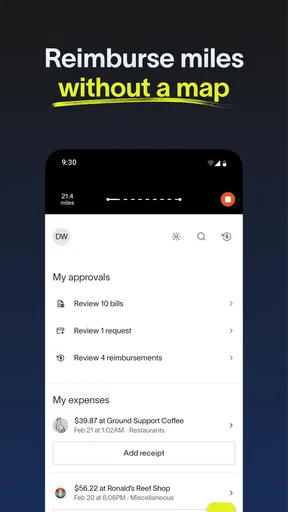
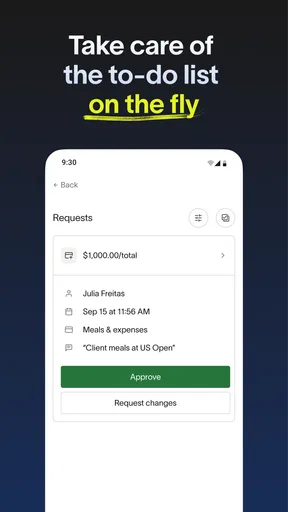
The mobile experience can make it easier for employees and administrators to manage business expenses while away from a computer. Depending on the account setup, users may be able to view transactions, submit receipts, request or review spending, manage reimbursements, and receive alerts. The exact tools can vary by role, subscription, device, and region, so some users may see fewer options than account administrators.
Is Ramp safe to use for business expenses and financial information?
Ramp handles sensitive business and financial information, so security is an important consideration before using it. The platform typically includes account authentication, permission controls, transaction monitoring, and administrative tools intended to reduce unauthorized spending. However, no online service is completely risk-free. Users should protect login details, enable available security features, avoid sharing verification codes, and download the application only from an official store or trusted source.
Does Ramp charge fees, and are there any eligibility requirements?
Ramp’s pricing, card terms, and eligibility requirements can differ according to the product, business profile, location, and plan selected. Some features may be included in a company’s subscription, while others may involve separate conditions or limitations. Approval can also depend on business verification and financial information. It is best to review the current official pricing, terms, and eligibility details before applying or relying on the service.


